

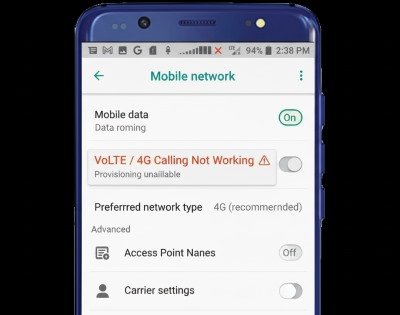

If VoLTE (Voice over LTE) or 4G Calling / HD Voice isn’t working on your Android, you may notice things like:
- Calls don’t connect, drop, or go straight to “Call ended”
- During calls, your phone drops from 4G/LTE to 3G/2G, and call quality becomes worse
- The VoLTE / 4G Calling toggle is missing in settings
- You get data on LTE, but voice calling fails (classic IMS/VoLTE provisioning pattern)
VoLTE is a voice service delivered over LTE using IMS, and it depends on device support + network provider support + correct provisioning.
Do this first
- Set Network mode / Preferred network type to Auto (5G/4G/3G/2G) or at least LTE/4G
- Turn VoLTE / 4G Calling ON (if the toggle exists)
- Toggle Airplane mode ON 10 seconds → OFF, then restart (fresh registration)
- Reset network settings (strong clean-slate)
- If still broken or toggle missing: reseat SIM / toggle eSIM line and ask your provider to re-provision VoLTE/IMS
Can’t Make Calls But Data Works on Android
Fix 1: Confirm your phone and plan actually support VoLTE
Before changing settings, confirm the basics: VoLTE requires (1) a VoLTE-capable phone, (2) a provider that supports VoLTE for your device, and (3) a compatible plan/SIM. Some providers only allow VoLTE on “approved/whitelisted” devices, which can make VoLTE fail even if the phone is technically capable.
Fix 2: Check the easiest proof: does your phone stay on LTE during a call?
This is a simple reality check: place a call and watch the network icon.
- If it stays on 4G/LTE during the call, VoLTE is likely working.
- If it drops to 3G/2G, VoLTE may be off or not provisioned.
This test doesn’t require hidden menus and works on almost every Android device.
Fix 3: Enable VoLTE / 4G Calling (toggle may be named differently)
On many phones the toggle is not called “VoLTE.” It can appear as:
- VoLTE calls
- 4G Calling
- HD Voice
- Enhanced 4G LTE Mode
- 5G Calling (some models)
Samsung’s official guide shows enabling VoLTE from Settings → Connections → Mobile networks → VoLTE calls.
Sony’s guide also shows a similar path and calls it 4G Calling / 5G Calling.
Fix 4: Set Network mode to Auto (don’t force 3G/2G)
If your network mode is limited, VoLTE won’t come up. Set it to an Auto option that includes LTE:
- Samsung-style: Network mode → 5G/4G/3G/2G (auto connect)
- Sony-style: enable 4G calling within the connected network settings
Extra tip: if you forced “2G only” for battery or coverage, switch it back.
Fix 5: Toggle Airplane mode to force re-registration
VoLTE needs the phone to register properly with IMS services. Toggling Airplane mode forces a clean detach/attach cycle, which can restore registration. Google Fi’s call troubleshooting includes general “reset the connection” steps like this.
After turning Airplane mode off, wait 60 seconds before testing calls.
Fix 6: Restart your phone (after enabling VoLTE or changing network mode)
Many phones only apply VoLTE/IMS changes after a reboot. Restart once after enabling VoLTE and switching network mode. This also clears stuck telephony services that sometimes happen after system updates.
Fix 7: If the VoLTE toggle is missing, reseat SIM or toggle eSIM line
If VoLTE disappears from settings, it’s often because the phone didn’t detect the right carrier configuration:
- Physical SIM: power off → remove SIM → reinsert
- eSIM: toggle the line OFF/ON (don’t delete unless you can re-add it)
Samsung community troubleshooting for missing VoLTE/4G calling frequently starts with SIM reseat to make network features reappear.
Fix 8: Reset network settings (strong, high success)
This is one of the best fixes when VoLTE breaks after an update or SIM change. It clears cached carrier/network configs and rebuilds them. Fairphone’s diagnostics flow includes resets as part of VoLTE call troubleshooting.
After reset, reconnect Wi-Fi and re-pair Bluetooth devices.
Fix 9: Update your phone software (and check for a follow-up patch)
VoLTE issues often spike after updates because modem configs change. If the problem started after an update, check for another update (sometimes a quick patch follows). After updating, restart and test VoLTE again.
Fix 10: Disable VPN and set Private DNS to Automatic (temporary test)
VPN and custom DNS don’t “normally” break VoLTE, but on some setups they can cause weird registration behavior or delayed connectivity. For troubleshooting, disable VPN and set Private DNS to Automatic; then test calls again. If it fixes the issue, re-enable one thing at a time.
Fix 11: Turn Wi-Fi Calling OFF temporarily (to isolate voice path)
Wi-Fi Calling and VoLTE are related services for many providers. If Wi-Fi Calling is enabled and your device keeps bouncing between Wi-Fi and cellular voice, calls may fail. Turn Wi-Fi Calling OFF, restart, then test VoLTE over cellular first.
Fix 12: Check if IMS/VoLTE is provisioned on your line (provider-side)
Even with the correct settings, VoLTE won’t work if the line isn’t provisioned for IMS/VoLTE. Fairphone’s VoLTE diagnostics calls out provider policy/whitelisting and provisioning as a key reason VoLTE fails.
This is why two people can have the same phone but different results on different providers.
Fix 13: Ask your provider to re-provision (refresh) SIM/eSIM services
If VoLTE worked before and stopped suddenly, a “re-provision” can fix it (your provider refreshes the service profile on your SIM/eSIM). Sony also notes that if 4G calling isn’t available, you should contact your network operator.
When you contact support, say: “Please check VoLTE/IMS provisioning and refresh my SIM/eSIM profile.”
Fix 14: Test your SIM in another VoLTE-capable phone (isolates SIM vs device)
This test removes guesswork:
- If your SIM works with VoLTE in another phone → your phone/config is the issue
- If VoLTE fails in another phone too → line provisioning/provider policy is likely the issue
Fairphone’s diagnostics uses SIM/device cross-testing logic to confirm whether the issue is provider-side.
Fix 15: Last resort: switch to a supported device/provider combination
If your provider does not support VoLTE for your device model (common with some imported/BYOD phones), VoLTE may never work consistently. Fairphone explicitly mentions unsupported operator/device combinations as a long-term blocker and suggests using a supported combination.
This is the step you only take after verifying settings + resets + provisioning.
Emergency Calls Only / SOS Only on Android
Sources
GSMA: VoLTE overview (VoLTE uses IMS)
VoLTE (Voice over LTE)

Fairphone Support: VoLTE / 4G calling diagnostics (provider support/whitelisting + troubleshooting)
https://support.fairphone.com/hc/en-us/articles/31316888339730-Having-trouble-making-or-receiving-calls-VoLTE-4G-calling-diagnostics

Samsung Support: What is Voice over LTE? + how to activate VoLTE calls
https://www.samsung.com/ie/support/mobile-devices/what-is-voice-over-lte/

Sony Support: How do I enable VoLTE? (Android 9 or higher)
https://www.sony-asia.com/electronics/support/articles/SX669701

Google Fi Help: Trouble with phone calls or Wi-Fi calls (general call troubleshooting steps)
https://support.google.com/fi/answer/6195552