

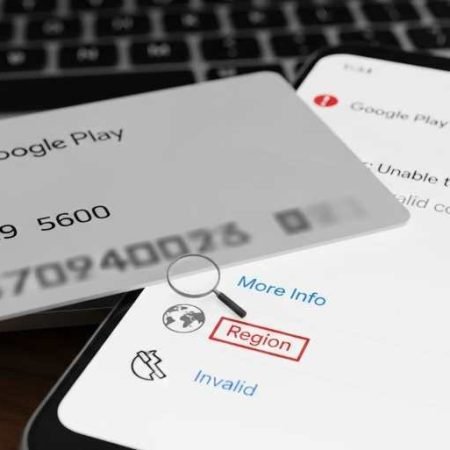

If you can’t redeem a Google Play gift card or promo code, you’ll usually see one of these messages:
- “We need more info to redeem this gift card”
- “This code can only be used in [country/region]”
- “Couldn’t complete your transaction. Your Play balance can only be used in [country/region]”
- “Invalid or incorrect code”
- “Code already redeemed”
- Promo code issues like: expired, not a Play promo code, or typed with spaces/dashes
Most of the time, the root cause is country/region restrictions, currency mismatch, account/payment profile mismatch, or a Play Store/Play services glitch.
1) Gift card vs promo code
- Gift card code adds money to Google Play balance.
- Promo code is a limited promotion and can be restricted/expired, and must be entered exactly (no spaces/dashes).
2) Region is the #1 blocker issue
Google says you must be present in the country where the gift card was purchased / promo is offered, and the gift card currency must match your payments profile.
Do this first
- Confirm you’re in the same country/region as the gift card/promo and your currency matches your payment profile
- Enter code carefully: no spaces or dashes, correct letters
- Turn VPN OFF, switch Wi-Fi ↔ mobile data, try again
- Clear Play Store cache, then retry redeem
- If it still says country/region or “more info”: submit Google’s redemption form (official path)
Google Play Payment Declined / OR-CCSEH-21: 14 Fixes
Fix 1: Re-enter the code the correct way (promo codes especially)
For promo codes, Google says:
- Don’t use spaces or dashes
- Double-check letters/numbers
- Confirm it’s a real Google Play promo code, and confirm it didn’t expire
Fix 2: Make sure you’re in the correct country/region
For gift cards and balance usage, Google states:
- You must be present in the country where the gift card was purchased / promo is offered
- If you’re traveling, try redeeming/using balance after returning
Quick test: turn off Wi-Fi and try on mobile data (or vice versa). Sometimes a VPN or network route triggers region checks.
Fix 3: Check currency mismatch (payment profile issue)
Google also notes: Gift card currency must match your payment profile settings.
If your Google payments profile is set to a different country/currency, redemption may fail.
Fix 4: Turn off VPN / Proxy
VPN often causes “wrong country” and “more info” loops. Disable it, then redeem again.
Fix 5: Try redeeming on the web (alternate method)
Try redeeming from a browser while signed into the same Google account:
- play.google.com redeem page (or redeem inside Play Store settings)
(If one method glitches, the other often works.)
Fix 6: Clear Play Store cache (safe)
Settings → Apps → Google Play Store → Storage & cache → Clear cache
Then open Play Store and try redeem again.
Fix 7: Clear Play Store data (strong)
If cache doesn’t work:
Settings → Apps → Google Play Store → Storage → Clear storage/data
Then retry redemption.
Fix 8: If it says “Code already redeemed”
First check your Play balance in the same Google account.
Sometimes it’s already added to a different Google account you used earlier (switch accounts and check).
Fix 9: If it says “Invalid code”
Common reasons:
- Code typed wrong
- Card/code was never activated by the retailer
- Code is for a different country/region
If it’s a physical card, confirm the cashier activated it properly.
Fix 10: If it says “We need more info to redeem this gift card”
This usually points to Google requiring verification on that redemption attempt. Google’s official guidance in region-related errors is to use their form if you’re sure you meet the conditions.
Fix 11: If it says “Play balance can only be used in [country]”
Google explains Play balance usage is also location-based. If you’re traveling, try again when you’re back in your home country.
Fix 12: Update your Play country (only if you truly moved)
Google notes that if you moved to another country, you may need to change your Google Play country.
Important: This is not a quick trick. It can have limits/conditions, so only do it if you actually relocated.
Fix 13: Avoid too many rapid attempts
If you try many times quickly, systems can temporarily flag the attempts. Do a clean attempt after:
- VPN off
- Correct network
- Play Store cache cleared
- Correct country/currency
Fix 14: Use Google’s official gift card/code help path
If you meet the conditions and it still fails, Google’s guidance is to submit the issue via their official flow/form.
Play Store “Something Went Wrong / Try Again” Error: 14 Fixes
Sources
Google Play Help: Fix problems with Google Play gift cards & codes
https://support.google.com/googleplay/answer/11564359

Google Play Help: Promotions on Google Play (promo code rules, spaces/dashes, expiry)
https://support.google.com/googleplay/answer/15698521

Bitrefill Help: Submit redemption appeal to Google (links to Google’s form path)
https://help.bitrefill.com/hc/en-us/articles/24740484313362